Overview
The Maker application is used to design and configure HMI screens, connect data points, and manage project resources. It provides a visual workspace with drag‑and‑drop tools for efficient project creation.
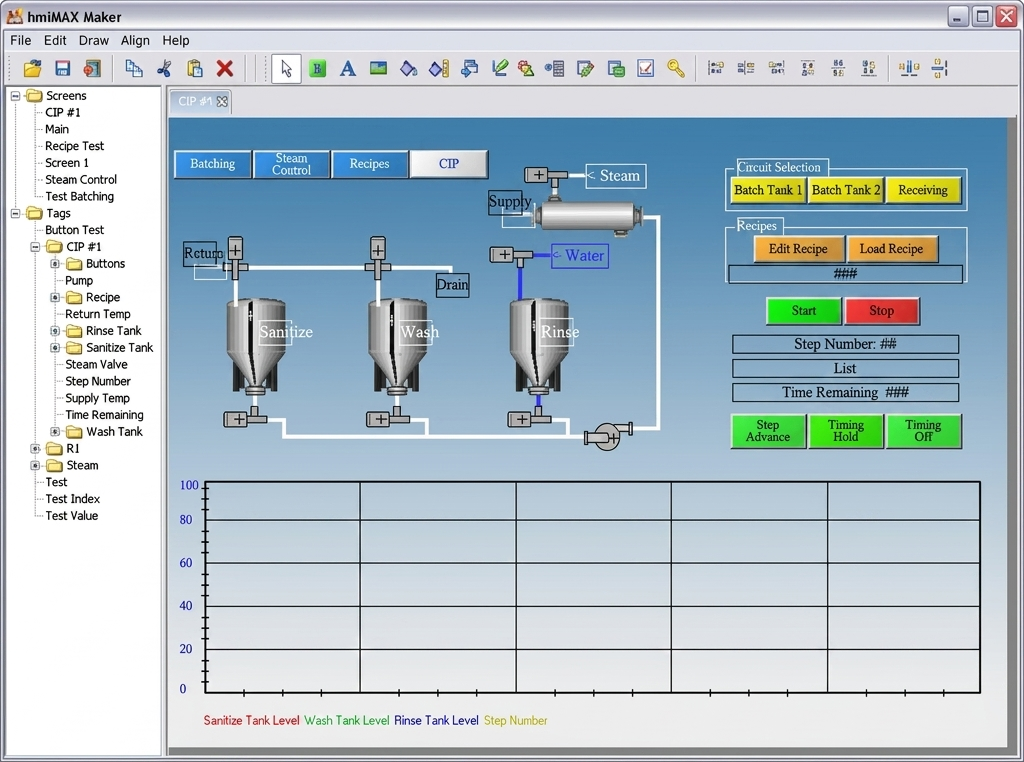
Project Workspace
The main workspace displays your HMI screen layout. You can add new screens, rename them, or switch between them using the screen selector panel. The zoom controls and alignment tools assist in precise layout design.
Elements and Properties
The Elements palette contains buttons, indicators, charts, and other HMI controls. Selecting an element displays its properties on the right side of the screen. Properties include color, font, visibility, and tag binding options.
Data Bindings
Each element can be linked to a data source such as a tag or PLC variable. You can assign read/write permissions and use formatting options to display values appropriately. Data bindings connect the visual interface to live system data.
Tips
- Organize your tags and elements using clear naming conventions.
- Use grid snapping for consistent alignment.
- Group related elements for easier movement and duplication.